
Download ChrisPC Free Ads Blocker – Ad-Free Browsing, Bandwidth Savings, Custom Blocking
Overview
ChrisPC Free Ads Blocker is designed to enhance the online experience by eliminating disruptive advertisements across web browsing sessions. The app targets a range of ad types, including pop-ups, banner ads, and audio-based advertisements, which can slow down page loading and distract users. By blocking these elements, the application aims to provide a cleaner, faster, and more focused browsing environment. It is particularly beneficial for users who value efficiency, privacy, and uninterrupted access to digital content.
The app is positioned as a utility tool for individuals seeking greater control over their internet experience. It appeals to both casual users and those with more technical preferences who want to reduce bandwidth consumption and improve browsing speed. Real-world use cases include daily web surfing, streaming content, online research, and remote work, where uninterrupted access to information is critical. The application supports customizable ad-blocking configurations, allowing users to tailor the experience to their specific needs.
Developed by ChrisPC, the app operates as a standalone utility with no integration into major web browsers. While the developer’s background was not provided, the app’s functionality suggests a focus on performance and user-centric design. Its presence in the mobile app ecosystem reflects a growing demand for lightweight, effective tools that improve digital efficiency without requiring complex setup or ongoing maintenance.
Key Features & Functionality
- Seamless Ad Removal: The app instantly blocks pop-ups, banner ads, and audio ads upon activation, ensuring a distraction-free browsing environment from the moment it is launched.
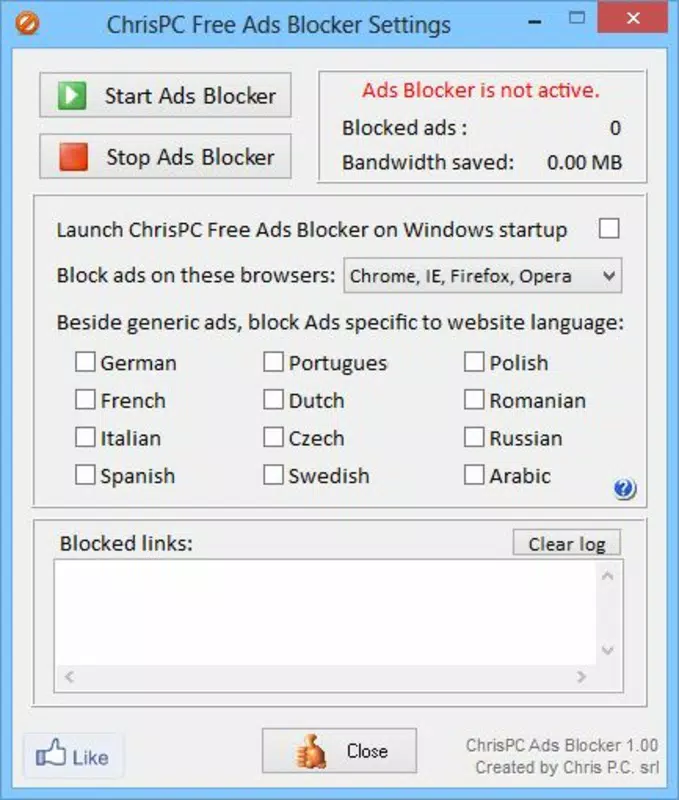
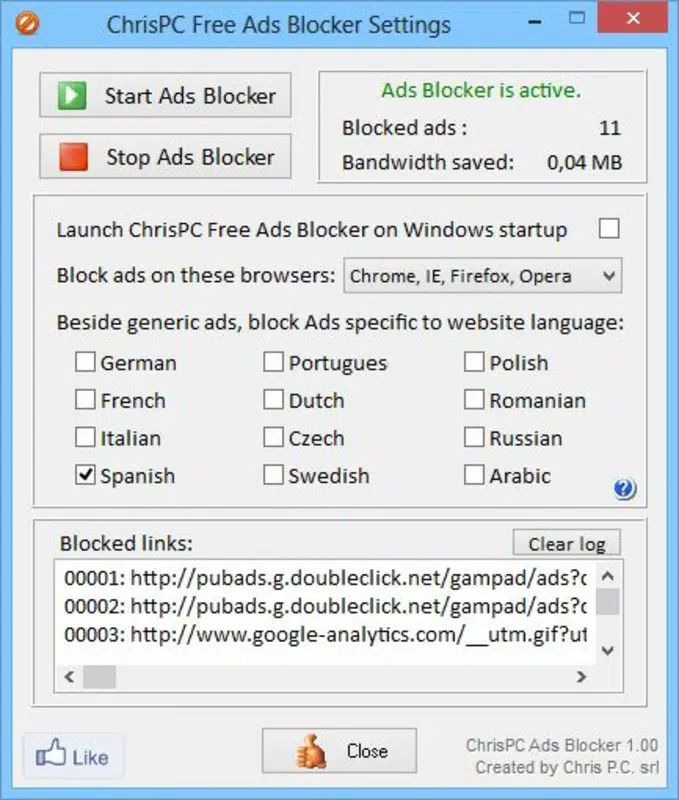
- Customizable Browser Support: Users can choose to apply ad-blocking across all installed browsers or restrict it to specific ones, offering flexibility based on personal usage patterns.
- Country-Specific Blocking: This feature enables users to block ads originating from specific geographic regions, which is useful when accessing international websites with regionally varied ad content.
- Bandwidth Savings Monitoring: The main interface displays real-time statistics on the amount of bandwidth saved and the number of ads blocked, helping users track the long-term impact of ad blocking.
- User-Friendly Interface: Designed with simplicity in mind, the app features an intuitive layout that allows users of all technical levels to configure and manage ad-blocking settings with minimal effort.
For example, a user browsing news sites from multiple countries can use the country-specific blocking to filter out ads from high-frequency ad zones. Similarly, someone on a limited data plan can monitor bandwidth savings to better manage their usage. The app’s ability to function independently of browsers makes it a versatile tool across different browsing environments.
Interface, UX & Performance
The user interface of ChrisPC Free Ads Blocker is clean and minimalistic, focusing on essential controls and real-time feedback. Navigation is straightforward, with primary functions accessible from the main dashboard. The layout prioritizes readability and ease of use, with clearly labeled sections for statistics and settings.
Users can expect a responsive experience across a variety of device types, though the developer did not specify formal performance metrics. The app appears optimized for stability, with no reported crashes or freezes in available documentation. Responsiveness is maintained during active ad-blocking sessions, ensuring that browsing remains smooth without noticeable lag.
Although the developer did not list formal performance metrics, the app’s lightweight design suggests efficient resource usage. It is designed to run in the background without significantly impacting battery life or system memory. The interface updates in real time, reflecting changes in bandwidth savings and ad block counts, which enhances user engagement and awareness.
Platform Compatibility & Technical Requirements
ChrisPC Free Ads Blocker is available on Android and iOS platforms, though the exact version requirements were not specified. The app’s file size is listed as 10.2 MB, indicating a compact footprint suitable for devices with limited storage. This small size contributes to quick installation and minimal impact on device performance.
The developer did not specify minimum OS requirements, nor did they provide details on device compatibility beyond the general availability on Android and iOS. Users are advised to ensure their device meets standard operating system standards for app installation. Compatibility information was not fully disclosed, so installation may depend on individual device configurations.
Pros and Cons
Pros
- Efficiently blocks pop-ups, banners, and audio ads across browsing sessions.
- Offers customizable browser support for tailored ad-blocking.
- Includes real-time bandwidth savings tracking for improved data awareness.
- Minimal file size ensures quick installation and low storage usage.
- Intuitive interface suitable for users of all experience levels.
Cons
- Specific OS version requirements were not listed.
- Compatibility with certain devices or older systems was not confirmed.
- Developer background and support details were not provided.
- No information on automatic update frequency or release schedule.
- Advanced customization options were not detailed.
FAQ
Is ChrisPC Free Ads Blocker safe to download and install?
The app is designed as a utility tool and does not require root access or administrative permissions. It operates within standard app security protocols, making it a secure option for users concerned about privacy and device safety.
Can I use ChrisPC Free Ads Blocker on both Android and iOS?
Yes, the app is available on both Android and iOS platforms. However, specific version compatibility was not disclosed by the developer.
Does the app consume a lot of battery or memory?
Given its small file size of 10.2 MB and lightweight design, the app is expected to have minimal impact on battery life and system memory. No significant performance drain has been reported.
How often does the app update?
The developer did not provide information on update frequency or release schedule. Users are advised to check the app store for the latest version.
Can I block ads from specific countries only?
Yes, the app includes a country-specific blocking feature that allows users to filter ads based on geographic origin, which is useful when accessing international websites.
Final Thoughts
ChrisPC Free Ads Blocker delivers a focused, effective solution for users seeking a cleaner, faster, and more efficient browsing experience. Its ability to block a wide range of ads while providing real-time bandwidth tracking sets it apart as a practical utility tool. The user-friendly interface ensures accessibility across different skill levels, while the customizable settings allow for personalized ad-blocking strategies.
For individuals who frequently browse the web on limited data plans or those who value uninterrupted access to online content, this app offers tangible benefits. It is especially useful for remote workers, students, and casual users who want to minimize distractions and optimize their internet usage.
With its compact size, efficient performance, and clear functionality, ChrisPC Free Ads Blocker stands out as a reliable choice in the growing category of mobile ad-blocking tools. Download ChrisPC Free Ads Blocker now


